.png?width=2000&height=2000&name=Untitled%20design%20(4).png)
account suspended
google ads
Marketing


Log into almost any account an agency runs, and the lightbulb icon carries a number. Dozens of suggestions sit there, unapplied. The optimization score sits below 100%. To a business owner paying that agency, it can look like neglect, since Google is handing out free advice and the people you hired keep walking past it.
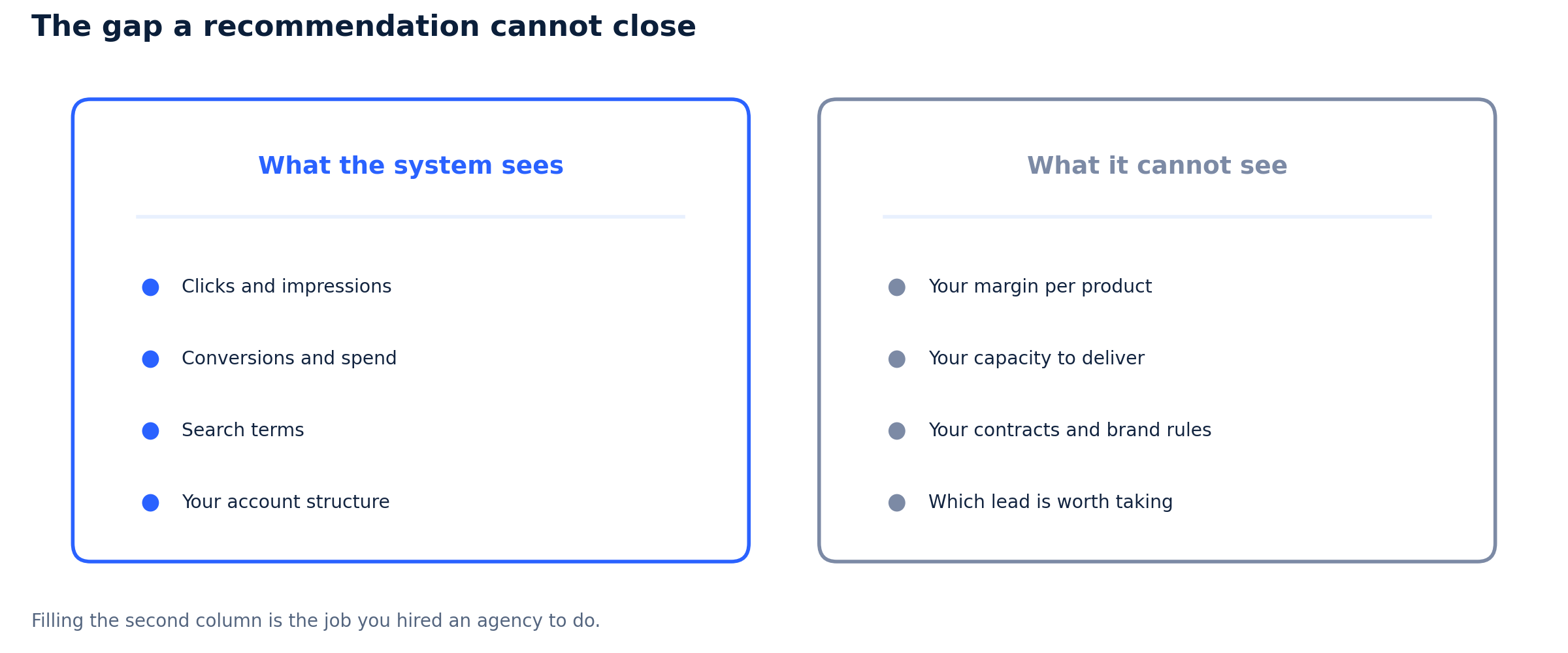
The picture changes once you see what a recommendation is. It is a suggestion produced by a system that reads your account and cannot read your business. It does not know your margins, your delivery capacity, or the contract you signed with a distributor. Filling that gap is the job you hired an agency to do. So the ignoring is not laziness, most of the time. Agencies also ignore recommendations for bad reasons, and that part deserves saying too.
Start with the thing itself, because plenty of advertisers scroll past it without a real look.
The Recommendations page lists changes Google suggests for your account, each carrying a score uplift, and the sum of those uplifts drives your optimization score. The suggestions are not random. Google builds them from your account data and its own best practices, and the list spans bidding, keywords and targeting, ads and assets, and repairs such as upgrading your conversion tracking. Google also states that the recommendations shift over time to match its best practices and tells you to check the page often. So this is a live, moving list of what Google wants you to do, not a fixed audit of your account.
One gap explains why a good agency reads that list with a cold eye. A recommendation gets generated without the facts that decide whether it is a good idea.
Google's system sees your clicks, your conversions, and your spend. It cannot see your margin on each product, so it cannot know that the leads it wants to buy you lose money on delivery. It cannot see your capacity, so it cannot know your sales team is three people who are already drowning. It cannot see your stock, your contracts, your brand rules, or the customer segments you refuse to serve. A suggestion to widen your reach reads as growth to a machine counting conversions, and as a disaster to a business shipping from one warehouse. So the agency is not overruling a smarter system. It is supplying the inputs that system never had.
Some suggestions do not wait for your yes. Google can apply them for you.
Auto-apply lets Google make changes to your campaigns without asking each time. The scope is wide. Google lists bidding recommendations, keywords and targeting recommendations, dynamic search ads, optimized ad rotation, and conversion tracking upgrades among the things it can apply for you. Agencies switch most of these off, because a bid strategy change or a keyword expansion decides how your money gets spent and on what.
Sources disagree on how accounts end up opted in, and I cannot settle it from Google’s public pages. Google describes auto-apply as a feature you turn on. One agency reports that opting in is manual, yet people still find themselves opted in without knowing, through a previous manager or a stray click. Others report Google switching some auto-applies on by default, above all on accounts that never touch the tab, and note there is no single button to turn them all off. Treat the dispute as unresolved and check your own settings, since that is the same action either way. Google tells you where to look: the Recommendations page, or Admin, then Account Settings, then Auto Apply. Your change history will label anything applied this way.
Now the turn, because a fair article does not stack one side of the table.
Two facts cut against the cynical read. Google’s own page states that auto-applying recommendations will not increase your budget, and that budget raising sits outside this version of the feature. So the darkest version of the story, Google lifting your spending cap behind your back, is not what the documentation describes. Read that limit with care, though. Auto-apply can add keywords and change a bid strategy, and both decide what your existing budget buys and how fast it drains. The cap sits on the number, not on the behavior. The second fact is that Google prunes its own list: from January 26, 2026, it stopped the responsive search ads recommendation from suggesting or applying new ads and removed it from the auto-apply page. A company defending every suggestion does not delete one.
So the agency has a case. The blanket version of that case is still wrong.
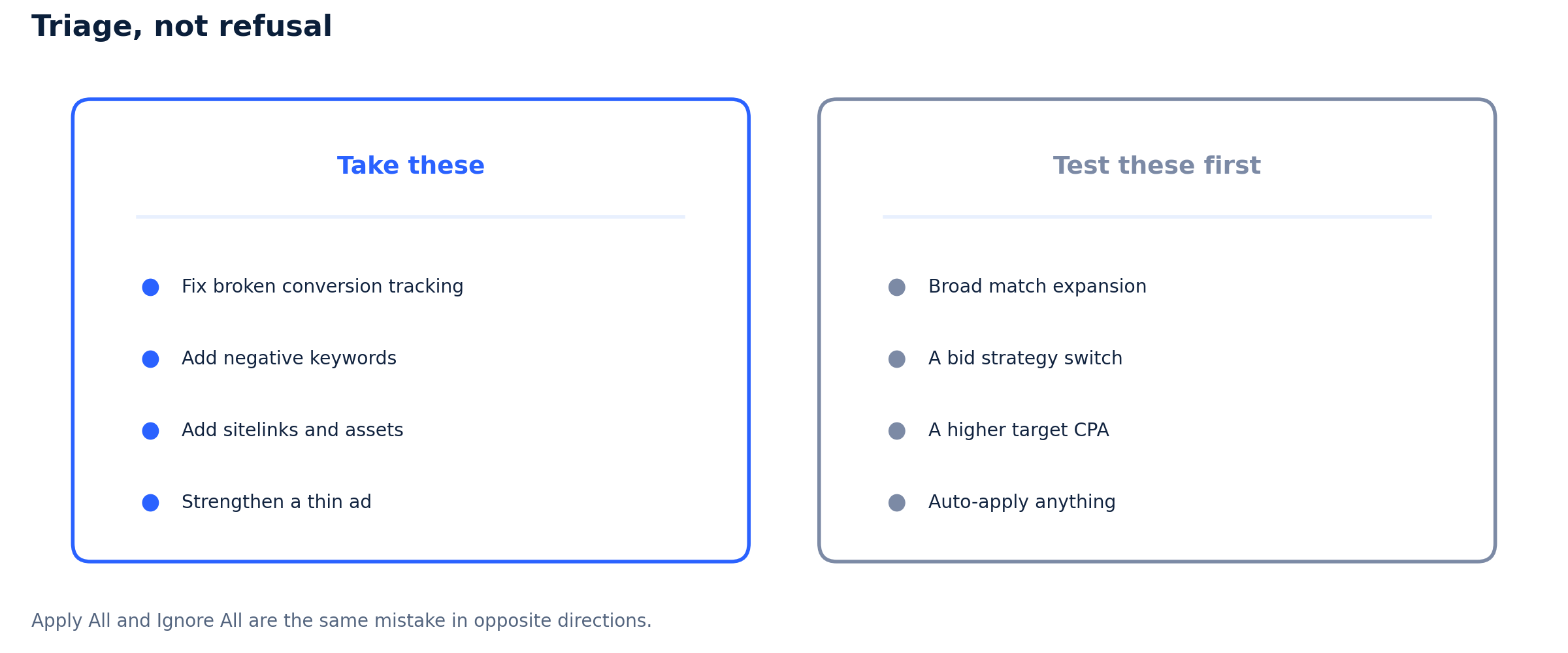
Ignore the whole list and you skip repairs that cost nothing and help: broken conversion tracking, negative keywords for search terms that waste money, missing sitelinks, a thin ad. Refusing those is neglect wearing discipline’s clothes. The numbers do not back a blanket no either. A study by the tool Optmyzr found accounts scoring above 80% showed better cost per acquisition and return on ad spend on average than accounts below 70%. Correlation is not proof, and that is one platform’s sample, but it does not describe a list of junk. An agency that applies every recommendation and an agency that ignores every recommendation are making the same mistake in opposite directions. Both skipped the thinking.
|
Read the list. Apply none by reflex. A recommendation knows your clicks and not your margins. Apply All and Ignore All are the same mistake in opposite directions, because both skip the step that matters. |
Triage, not refusal, is the professional standard.
Read every recommendation and apply none by reflex. Take the free repairs. Test the expensive ideas in one campaign with a capped budget rather than across the account. Dismiss what does not fit, since dismissing is a normal use of the tool and not an insult to Google. Log the reason, so your client sees the thinking and the next manager does not undo it. Judge each item against profit rather than the score, because a lower score with a strong return beats a high score with wasted budget. Check the auto-apply settings at the start of every engagement and after any handover, since agencies report leaving only a few of them on. That discipline is the work behind competent Google Ads Management Services, and it runs slower than clicking Apply All, which is rather the point.
We work on Google Ads accounts, including suspensions, so weigh the source. The easy sell would be that Google’s recommendations are a trap and only a hired expert can save you from them. We will not run that line, because half the list is useful and free, and you can read it yourself. What holds up is narrower: a recommendation carries no knowledge of your margins, so the yes or no belongs to someone who has them. And if your ads stopped because of a Google Ads account suspended notice rather than a setting, nothing on that page will help you, because a separate review team makes that call and it is a different fight from this one.